

In this guide
1. Start with who is still around to ask
Before you sort anything, take one envelope of old photos to the oldest relative you can visit. Ask who is in them and where they were taken, and write the answers down or record the conversation. Scanning can wait for years. A person’s memory of who that is in the back row may not.
2. Sort into three piles
Set a timer for an hour and don’t look at anything for more than a few seconds.
- Keep and scan: faces you know, family events, houses, anything you would be sorry to lose.
- Keep the print only: duplicates of important photos, which you can pass to relatives.
- Let go: blurry shots, landscapes from a trip nobody remembers, and the fifth photo of the same birthday cake.
Aim for a small first batch. Fifty scanned and labeled photos are worth more than five thousand in a box.
3. Label them gently
Write on the back in pencil, near the edge, and press lightly. Ballpoint and marker can dent the print or bleed through in time. Add names, a place and a rough year. A guess marked with a question mark still helps.
4. Scan what matters
A flatbed scanner gives the cleanest copy. Wipe the glass and lay the print flat. The Library of Congress suggests 300 dpi for 4x6 and 5x7 in prints, and 400 or 600 dpi if you plan to enlarge them to 8x10 in or bigger. If a photo might end up large, on a wall or a blanket, use 600. Save the files with a name you can search, such as 1962 Lake trip Ruth and Al.
No scanner? A phone scanning app works for a first pass. Lay the print flat in even daylight, hold the phone straight above it and avoid glare. Some libraries and local shops can scan for you, and a scanning service makes sense for a large collection, though you will want to check how your originals are handled.
5. Back them up in two places
Keep one copy in cloud storage and another on a drive at home. Share a folder with the family, and tell them it exists. If only one person knows where the photos are, they aren’t really safe.
6. Store the originals well
Attics, basements and garages are hard on photos because of the heat and damp. A closet in the main part of the house is better. Use acid-free, lignin-free boxes or sleeves if you can. Old sticky-page albums can damage prints over time, so if photos lift off easily, move them. If they won’t come loose, don’t force them. Scan the whole page instead.
7. Put the best ones back where people can see them
This is the point of all the work. A few ideas, from least to most effort:
- Frame one photo per generation and hang them together in a hallway.
- Send each relative one photo they have never seen, with a note about it.
- Make a photo book for a birthday, with the names written in.
- Use the set you scanned as a family slideshow at the next get-together.
- Turn them into something you can use every day, such as a blanket.
- Turn one good photo into a photo puzzle for an evening around the table. The bigger the puzzle, the sharper the scan needs to be.
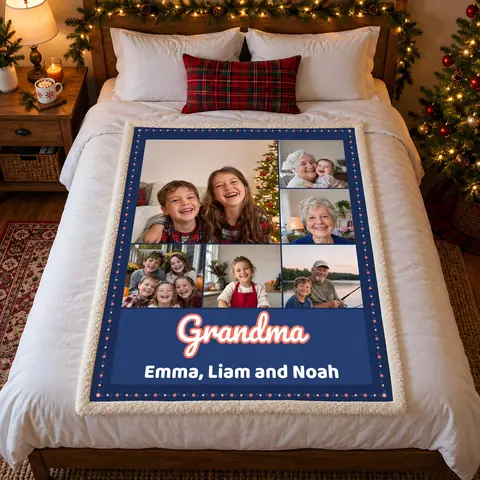
Using scanned photos on a blanket
Our photo blankets work well with scans, as long as you match the photo to the spot it will fill.
- Send the scan itself rather than a photo of it on a screen. Old photo? Scan it flat.
- Choose a grid of 6 or 9 if your scans are small. Smaller files can work for the small spots.
- Save the big spot for your sharpest image. Two big photos, One big photo or a Grid of 4 usually needs the full-size original, especially at 50x60 or 60x80 in.
- Faded color and a bit of grain are part of an old photo, and they are usually fine. Very dark or very blurry images are harder.
- Not sure about one? Send it anyway. We check every photo and message you within 1 business day if it won’t print well.
Photo blankets

Photo Collage Blanket with Text
Two big photos, one big photo or a grid of up to 9, with a title and up to two more lines.
from $44.99See it on Etsy
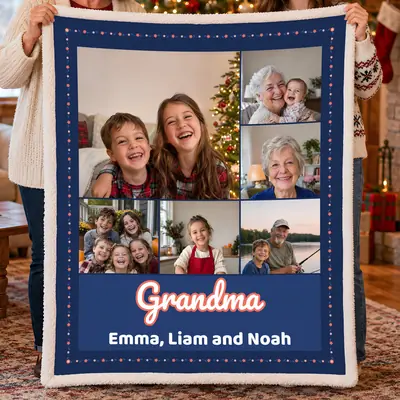
Photo Collage Blanket for Grandma
Up to 9 family photos, with Grandma, Nana or Mimi big across the bottom.
from $44.99See it on Etsy
The photo collage blanket with text lets you add a title and up to two more lines, such as a family name and the years the pictures cover. Only send photos you took or have permission to use. A family snapshot is usually simple, but a studio portrait may belong to the photographer.
Questions people ask
What should I do with old family photos I don’t want?
Offer them to relatives first, especially duplicates. Local history groups sometimes welcome photos of places and events, so ask. It is fine to let go of pictures nobody can identify and nobody wants.
What resolution should I scan old photos at?
300 dpi suits a 4x6 or 5x7 in print. Use 400 or 600 dpi if you plan to enlarge it to 8x10 in or bigger, as the Library of Congress suggests. Keep the original file and work from copies.
Can I put a scanned photo on a blanket?
Yes. Scan the print flat and send us the file. We check every photo and message you within 1 business day if one won’t print well.
Orders go through Etsy. Each See it on Etsy button opens our shop, The Kind Porch, where you personalize, pay and message us.